Leveraging fomo's Social Features: Leaderboards, Feeds, and Notifications
fomoDecember 25, 2025


Millions of coins, thousands of apps, and hundreds of different chains. Amidst all of this chaos, how is one expected to sift through all the dirt to find the diamonds in the rough?
You can track multiple individual wallets, but that is complex and very time-intensive. You can go through X or YouTube and hope you find some "high alpha" accounts sharing information. But how do you know who's a paid influencer doing undisclosed promotions and who's legitimate?
Research and discovery of undervalued projects/coins is difficult. There are too many places to look and very few entities you can trust.
The fomo app condenses your entire research and discovery process into a unified social feed.
So let's go through how you can leverage fomo's social features to enhance your crypto research and discovery.
The social feed
The social feed is your north star for discovering crypto assets. You can find it by clicking the middle button at the bottom of your screen.
It's a continuous feed showing trades made by smart traders on the platform. You get all the important information you need here:
- Coins purchased
- Amount purchased
- Amount sold
- When a position is fully closed
- Price change since purchase
- Total profit/loss once a position is closed
If you replace your hours spent doomscrolling TikTok and X with scrolling through your fomo social feed, you are going to be a lot more profitable.
On this feed, you can find smart traders, see how good they are at spotting undervalued gems, and follow them. You will then get round-the-clock updates on every buy/sell made by them. It's a constant feed of alpha.
For example, if you're scrolling through your social feed and see a bunch of traders buying FLOKI. You should start thinking to yourself as to why this is happening. Is there some news that you missed? Is a new memecoin narrative brewing?
Use this information to conduct further research on why so many traders are buying. If your research suggests that the traders on your social feed may be onto something, then you could be early to a trend, but if your research indicates that this is a short-term, unsustainable rally, you've saved yourself a couple of shekels.
Lean on the social feed, you never know what you might find.
There's a lot more cool stuff you can do with your social feed.
Let's say a new trade pops up where a trader has opened a new position on a coin. You can click on that trade and directly tap into the entire trade.
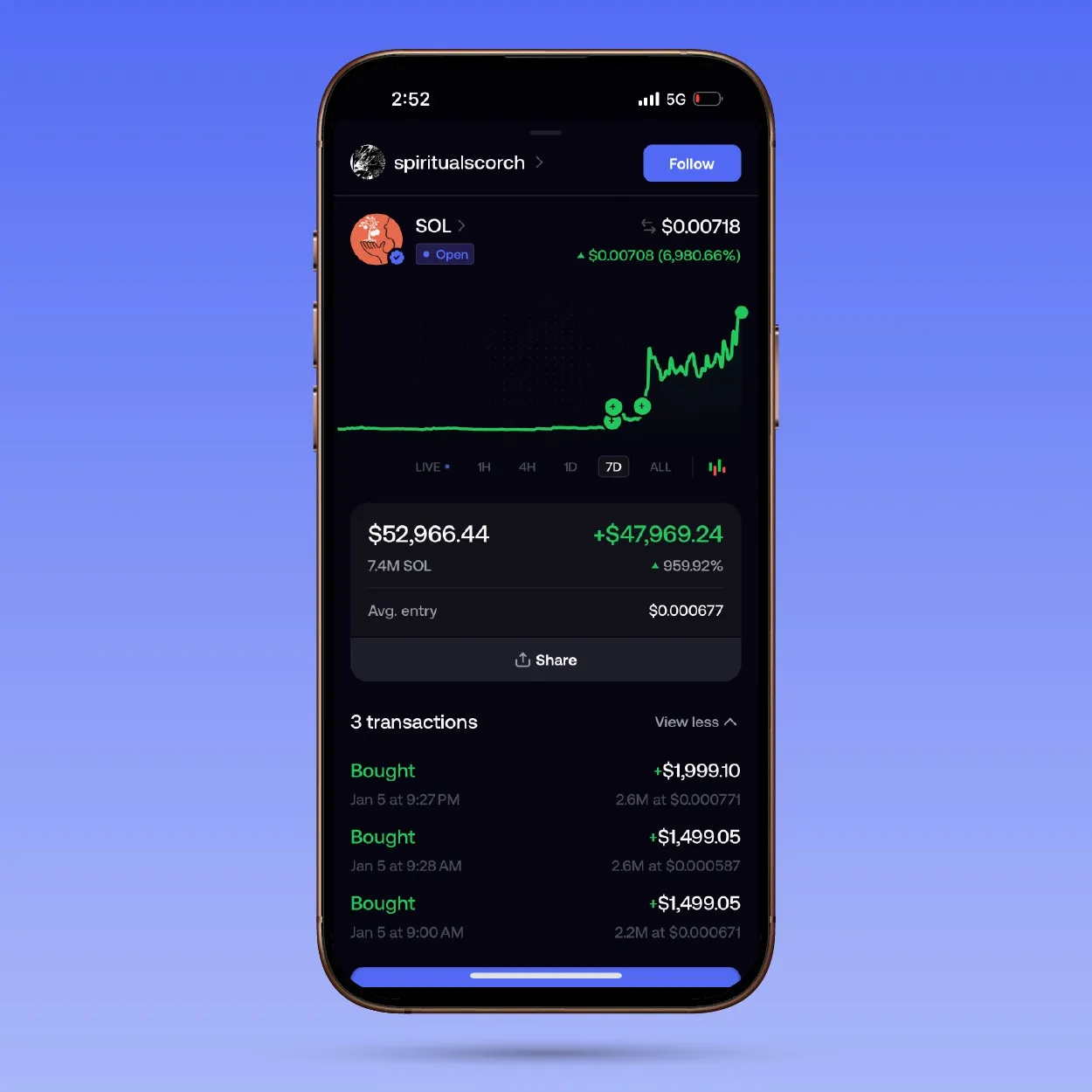
You can see all the buys/sells made by the trader, so you understand how their position has been built and when it has been built. Oftentimes, the trader will also attach a small comment outlining their thinking on the trade, which gives you a little more information as to where their head is at.
If you're more curious about the trader, simply click on the profile.
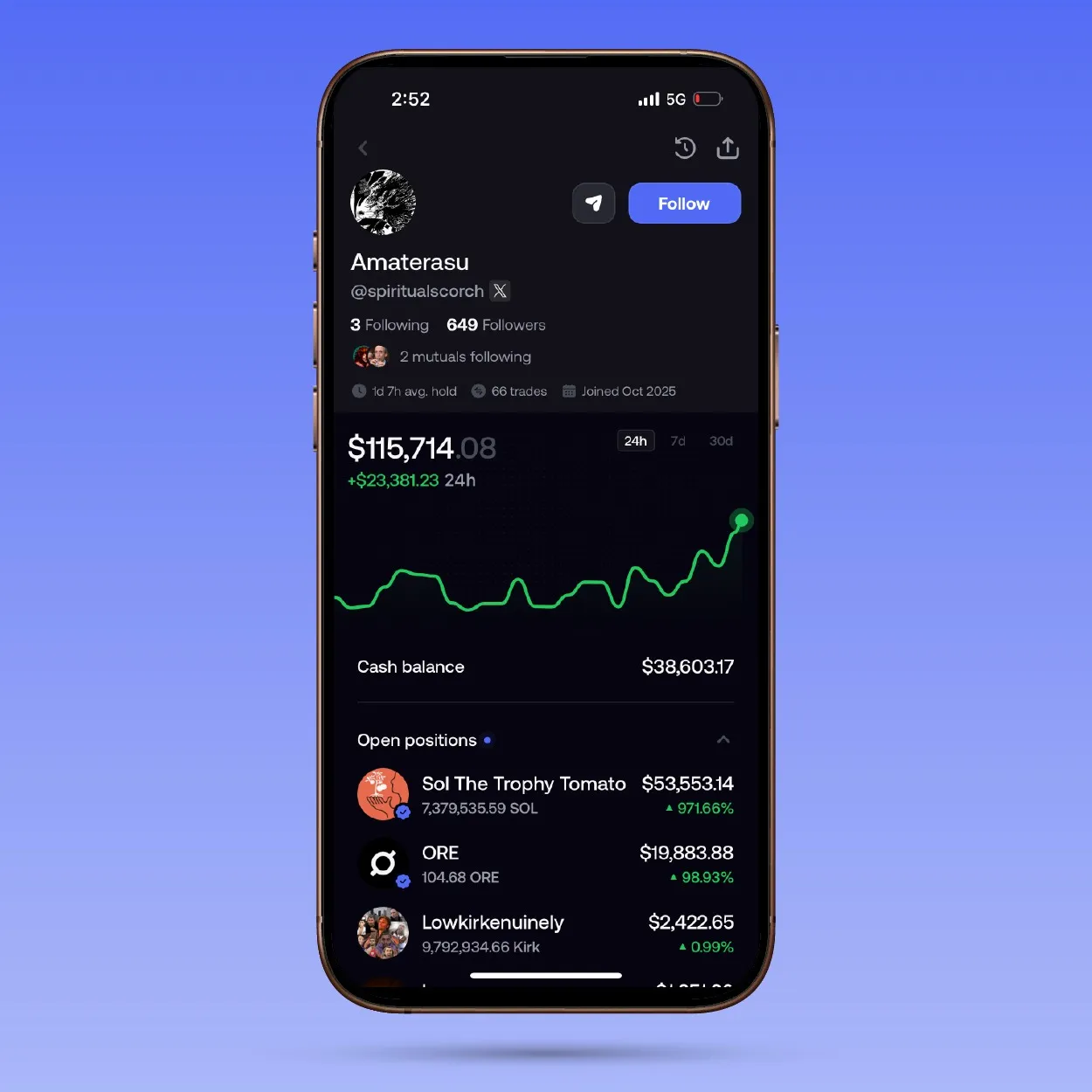
You should be able to learn a lot from here. You can view the trader's history and performance, see the various coins in their portfolio, and review the transactions they have made.
If you find them interesting, make sure to give them a follow so you see more of their trades.
Ultimately, there are many ways to leverage your social feed. Get creative with it. We're just giving you the paintbrush and the canvas; how the picture is painted is up to you.
Your social feed can be further enhanced by using leaderboards and notifications.
Leaderboards
By clicking on the button that's second from the right at the bottom of your screen, you should find yourself on the "Friends & Leaderboard" section.
The leaderboard displays the top traders on the fomo app across multiple time frames (24h, 7D, 30D, All-time). Select a time frame of your choice and review the leaderboard.
For example, let's imagine that a new narrative really picked up momentum today. You want to see who made the most money off this narrative by being the first to it. Maybe they'll be early to another one.
You filter by "24h" and click on the accounts you're interested in.
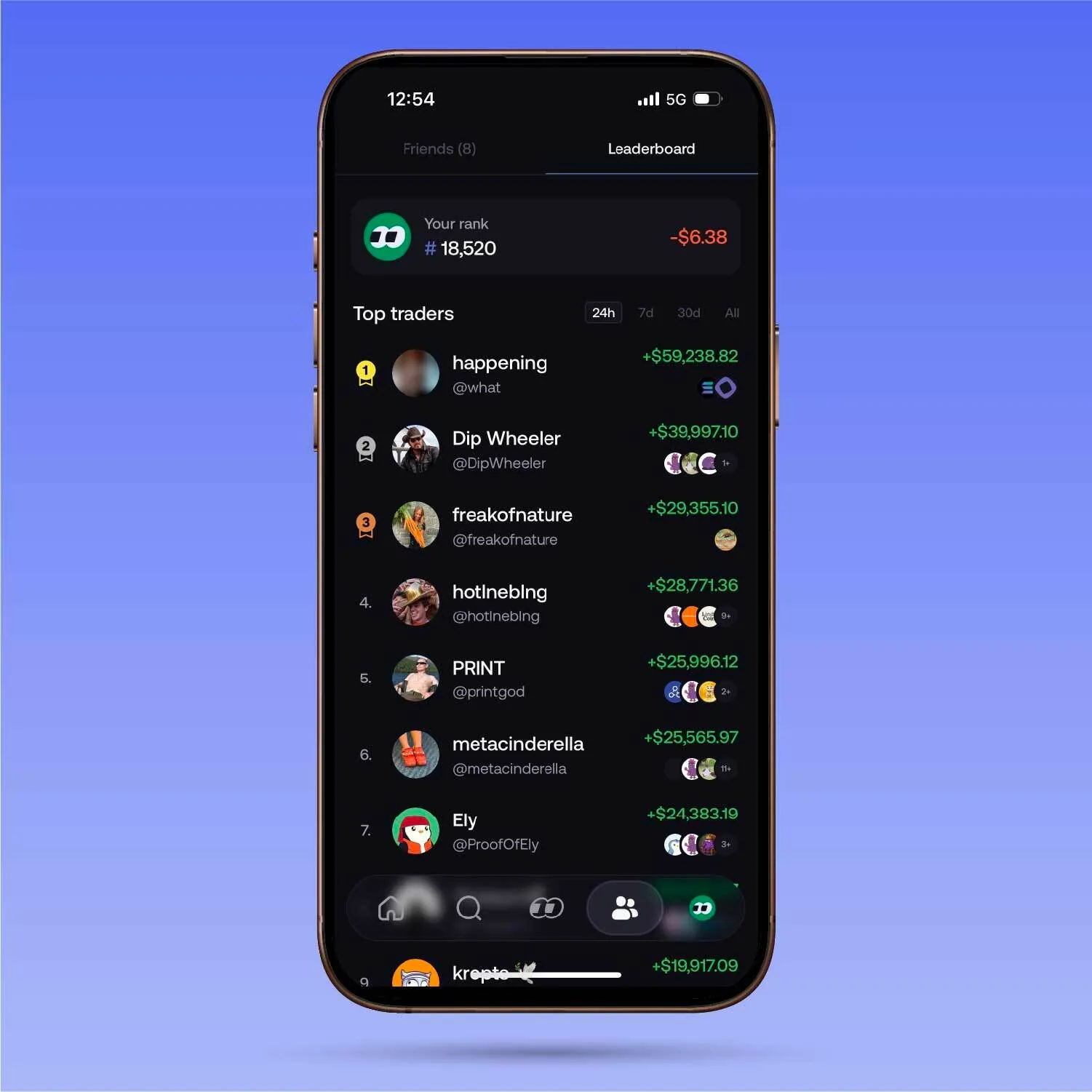
You get a complete breakdown of the profile. You can view their portfolio chart, current open positions, cash balance, and recent trades placed.
If the account in question is of interest to you, it's simple: drop them a follow so that they get added to your social feed.
You can do the same thing for different timeframes. Find multiple smart traders and follow them until you eventually have a social feed stacked with alpha.
From there, as and when you see trades get placed, you can do your own research on the asset and then decide if you would like to buy it or not. But it has cut down your research and discovery time by several hours.
Notifications
Firstly, make sure that you enable notifications for fomo through the "settings" on your mobile device. Yes, you might be terminally online, but turning on notifications will ensure you don't miss a thing, no matter what.
fomo allows users to really customize their notification settings to take their research and discovery process to another level.
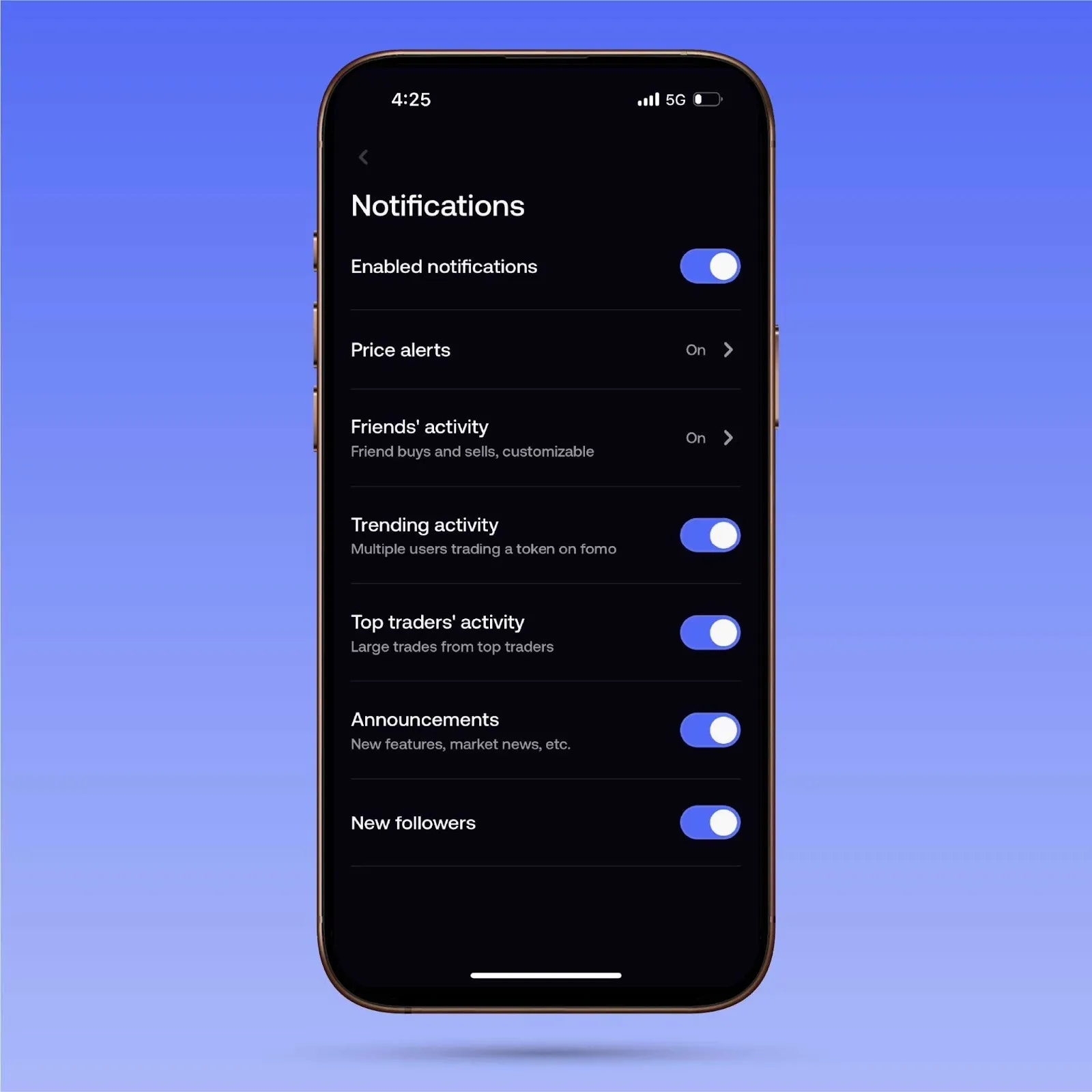
There are multiple notification customization options:
- Price alerts - fomo will give you constant notifications on price changes of assets in your portfolio. You're watching YouTube while eating a meal, and all of a sudden, a coin you're holding starts tanking. A timely notification from fomo could save you a few bucks, allowing you to quickly cut your losses early, straight through the app.
- Friends' activity - You will get notifications of all the buys/sells made by the accounts that you follow. You can filter the notifications by trade size (e.g., $1000 minimum) and also customize who you have notifications turned on for. If you only want three traders out of your entire follow list, you can easily disable notifications for the rest of your follows. Your feed, your choice.
- Trending activity - fomo will notify you of coins that are gaining a lot of momentum. If a certain coin is being bought by a lot of traders, you will be notified so you can see for yourself what's happening with that particular asset.
- Top traders' activity - By turning this on, you will get notifications on large trades made by the top traders. This provides valuable information, as you can know what the bigger players are looking at and make decisions based on that. You can research other assets in the same sector, or you could go against the grain and sell the asset if you owned it earlier.The choice is yours.
- Announcements - Staying up to date in the crypto industry is tough. fomo will constantly have announcements of market news, market research, and new features, among other things, to keep you constantly informed. If you don't want to miss another beat in this market, this will be a handy feature for you.
- New followers - You get notified every time someone follows your fomo account.
Ultimately, it comes down to having complete control and customizability over your crypto journey.
You can curate your own social feed as you please. You can mix and match your notification settings to best suit your needs.
If you would like less noise and an experience more tailored to just your friends, you can do so. On the other hand, if you just want to know what the top traders are doing, you can do that as well.
At the same time, you can keep your eyes on the leaderboard to see who's performing well in these markets. You can track their trades, understand their process, and emulate it yourself.
Our aim at fomo is to make crypto easier for you. The social features are just one such tool that can amplify your crypto trading abilities, if leveraged correctly.
To stay up to date with all the latest updates from fomo, be sure to follow us on X and join the Discord. To learn more about fomo, be sure to check out the website.